Send a Recurring Budget Card
Corporate Administrators can send a card with a recurring budget, if the Team and Card Issuer support this. To enable recurring budgeting, as the Corporate Administrator, navigate to Teams > Select a Team > navigate to Services.
Some budget types may be unavailable if they are not supported by your deployment method. If the budget types are supported by your deployment method but you can't see any options once you have enabled recurring budget cards, check the advanced card controls applied to your Card Pool.
 |
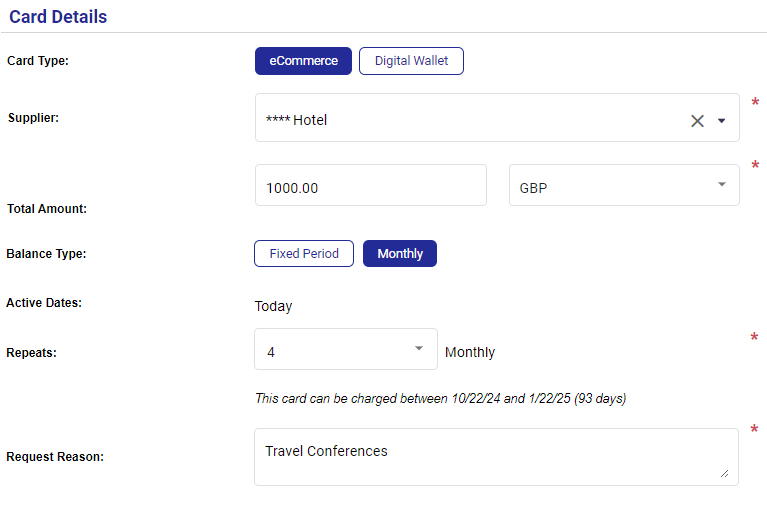
When sending a card, the Card Details section displays the Card Type, Balance Type, Active Dates, and Repeats fields.
Enter the card details as per the standard send card procedure, and choose a Budget Type of Monthly. The budget that you entered in the Total Amount field will be available each month.
The Active From field will default to 'Today'. The Active From field cannot be amended once the card is deployed.
Choose how often you want the budget to recur by entering it into the Repeat field. For example, entering 4 in the field will create a card where the budget recurs for 4 months.
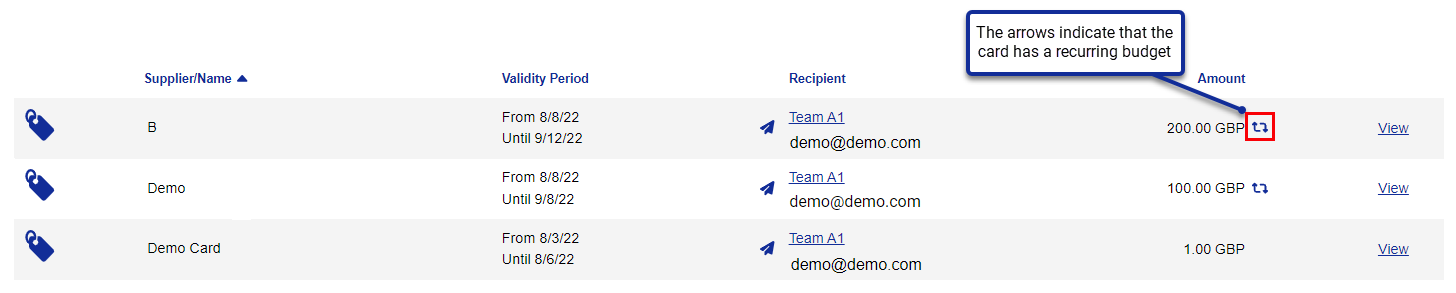
Cards with recurring budgets are clearly marked in Visa Commercial Pay Control.
 |