Invoice Reminders
Invoice Reminders
Invoice Reminders is an optional feature that enables you to send reminders to hotels when they have not yet provided an invoice/folio and are not marked as reconciled within the Visa Commercial Pay Reporting tool. Use of the Invoice Reminders Functionality is dependent upon transactions being reconciled in Visa Commercial Pay Reporting.
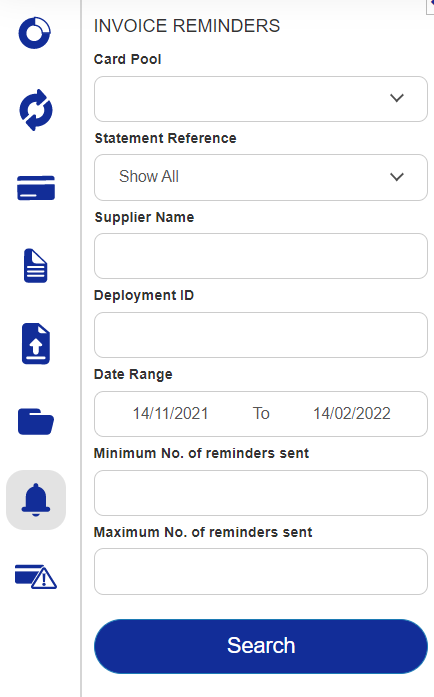
When you conduct an Invoice Reminders search, you can refine your results by the following criteria:
Card Pool
Statement Reference
Supplier Name
Date Range
Minimum no. of reminders sent
Maximum no. of reminders sent
 |
Click Search to see a list of Deployments and Transactions Requiring Invoice. These are transactions where the invoice breakdown has not been manually added, and the transaction has not been marked as invoice not required.
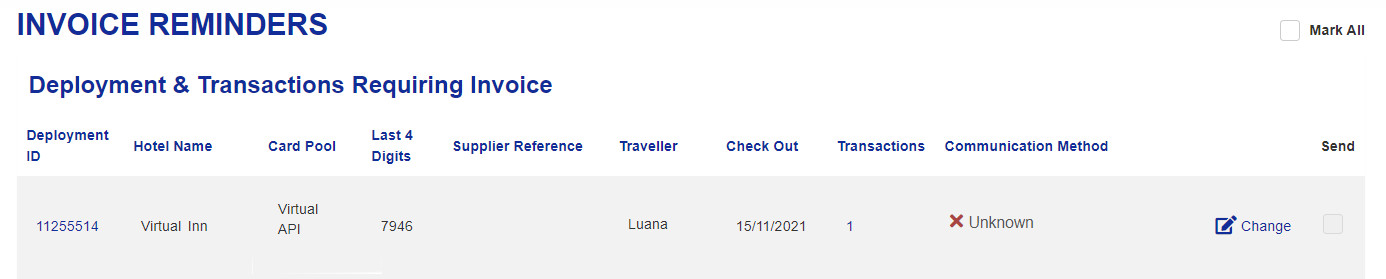 |
Click on any of the transactions listed to view further details. These include the date the reminder was last sent and how many reminders have been sent.
The communication method where the original confirmation was sent is auto-selected. Click Change to edit the communication method and manually add in an alternative email address.
You then have the option to send reminders individually by selecting the transactions you wish to send reminders for. You can tick the Mark All box in the top right corner to select all invoices on the page. When you select Mark All, the box label updates to Unmark All. Deselect the box to unselect all the invoices on the page.
Click Send at the bottom of the screen, to send an Urgent Invoice request via fax or email to each supplier you have selected.
You can change the communication method and manually add in an alternative email address, if required.
 |
When you select Mark All, the box label updates to Unmark All. Deselect it to unselect all the invoices on the page.