View Card
Corporate Administrators can view all cards from the Visa Commercial Pay Control dashboard.
To view cards sent to a specific Team Member, select a Team and then select a Team Member. All cards that have been sent to the Team Member will be listed below the Team Member Details, select a card to view card details.
No Card Holder Data is visible other than the last four-digits of the card number to reduce exposure of the card details.
If the complete card details are required, Corporate Administrators can view the deployment in Visa Commercial Pay Online.
The Card Details will show the following details:
Created By—the email address of the Team Member that created the deployment and the date it was created
Deployment ID—the unique ID generated by Visa Commercial Pay when a virtual card is created
Status—the status of the deployment;
Active—the card can be charged;
Canceled—the deployment has been canceled;
Pending Approval—the card is awaiting approval;
Expired—the card is not active for billing.
Approval Status—the approval status of the deployment
Email—the email address of the Team Member receiving the card
Team—the Team that the Team Member belongs to
Name—the name of the deployment
Total Amount—the value of the deployment
Validity—the dates that the deployment is available between
Last Four Digits—the last four digits of the card number
Request Reason—the free text note entered by the user to provide further context to the card's issuance
Advanced Card Controls—the advanced card control template linked to the Team
Custom Data Fields
When viewing a deployment in Visa Commercial Pay Control you will see a list of the custom data field labels and values captured during card creation.
You must configure custom data fields per each Team.
Card Activity
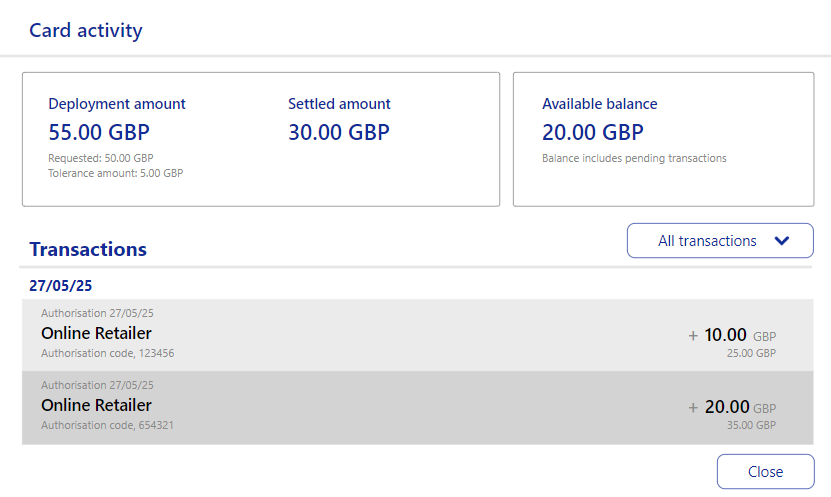
When viewing a card that is active or expired, as a Corporate Administrator you will be able to review the card activity. The card activity will display the real time remaining balance.
To view the available balance and transactions:
Select a card from your Visa Commercial Pay Control dashboard OR click Cards, search for a card, and click View on the card you want to view.

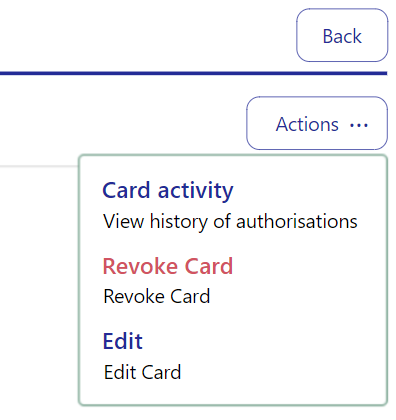
From the card details screen, click Actions and then click Card activity.
The card activity will show:
Deployment amount
Settled amount
Available balance
Transactions
Tolerances
Note
This functionality is only available to card deployments where Visa is the card issuer.