Route Types in Orchestration
Redirect
Redirect will send deployments that meet the parameters to a single specified Card Pool.
Example rule parameters (Card Pool A):
Spend type: Air
Amount threshold: £500.00
Currency: GBP
Rule type: Redirect (Deployments redirected to Card Pool B)
If you create an air deployment using Card Pool A and the total amount is equal to or greater than £500.00, then the deployment will be redirected to Card Pool B.
Use Cases
Designated Accommodation Card Pool
For reporting purposes, you may have designated one of your Card Pools to be used exclusively for booking travel. To prevent your team from accidentally creating an accommodation card from a different Card Pool, you can set a redirect rule which will automatically send the card request to the desired Card Pool.
The rule parameters should be as follows:
Spend type: Accommodation
Rule type: Redirect
Issuer Not Supported by Supplier
Your primary Card Pool's issuer may not be accepted by all suppliers. As a failsafe, you can set a redirect rule which will send card requests to an alternative Card Pool based on the supplier.
The rule parameters should be as follows:
Supplier name: Supplier 1, Supplier 2, Supplier 3
Rule type: Redirect
Note
To enter multiple suppliers, you must type each one in the following format, separated by a comma with no spaces:
Supplier 1,Supplier 2,Supplier 3
Load Balance
Load balance divides every 100 deployments between specified Card Pools, and this is referred to as the load balance percentage.
The load balance percentage is the number of cards out of every 100 that will be re-routed to configured Card Pool/s.
Re-routing is triggered when a deployment meets, or exceeds the amount threshold.
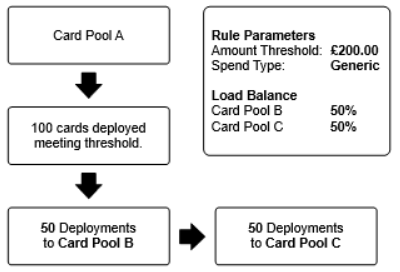
Example rule parameters (Card Pool A):
Amount threshold: £200
Spend type: Generic
Rule type: Load balance (Card Pool B: 50%, Card Pool C: 50%)
If you create 50 card deployments from Card Pool A, the deployments will be re-routed to Card Pool B. If you then create 50 more card deployments from Card Pool A, the deployments will be re-routed to Card Pool C. After 100 cards have been re-routed, the routing will return to Card Pool B.
 |
Alternative example rule parameters (Card Pool A):
Amount threshold: £200
Spend type: Generic
Rule type: Load balance (Card Pool B: 20%, Card Pool C: 20%, Card Pool D: 60%)
If you create 120 card deployments from Card Pool A, the first 60 deployments will be re-routed to Card Pool D, as this is the Card Pool with the highest weighting balance. The following 20 will be routed to Card Pool B, then the next 20 to Card Pool C, and the last 20 will be routed to Card Pool D.
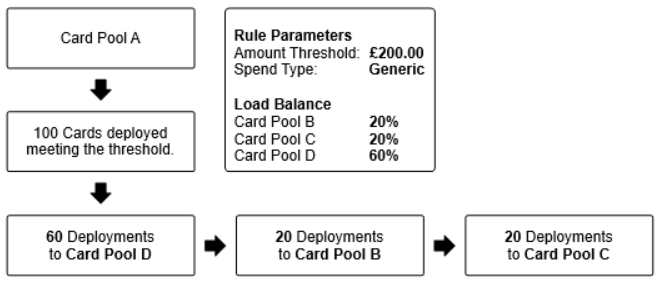 |
After this, there would still be 40 further deployments that will be re-routed to Card Pool D, before the routing returns to Card Pool B.
Use Cases
Balancing Spend Equally Between Card Pools
The funding account linked to your Card Pool may the type that collects reward points as you spend. You can configure a Load Balance rule that automatically distributes spend across multiple Card Pools based on a percentage weighting. Allowing you to spend equally across all funding accounts.
At least one rule parameter must be selected.
Block
Block will prevent deployments that meet the parameters from being issued.
Example rule parameters (Card Pool A):
Amount threshold: £1000.00
If you create a deployment using Card Pool A and the amount threshold is equal to or greater than £1000.00, the deployment will be blocked.
Use Cases
Approval Workflow Override
As an extension of your current approval workflow, or in absence of an approval workflow, you can configure a Block rule that automatically prevents cards from being deployed if they are over a certain amount.
The rule parameters should be as follows:
Amount threshold: £2,500
Rule type: Block