Visa Commercial Pay Online v3.24 Release Notes
Visa Commercial Pay Online v3.24 introduces functionality to allow Scheme (Visa BSAM) users access to an Issuer level admin user role, allowing them to be assigned to an issuer group. Access will be assigned via the Ask Now process.
Card Pool Group Read-Only View
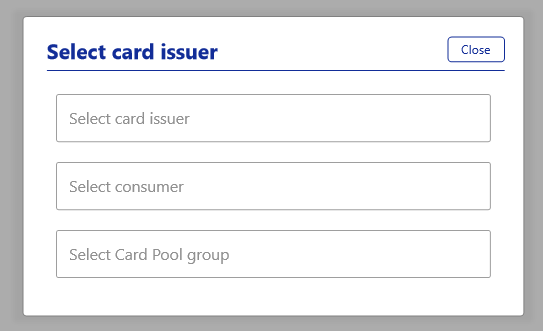
Card Issuer Admins in Visa Commercial Pay Online can select a Card Pool group and access a read-only version. We have added the ability for Card Issuer Admins to create Issuer Groups and link admins to the group, access must be requested via the Ask Now process. This allows Card Issuer Admins to select a card issuer from within Visa Commercial Pay Online and then select from a list of Card Pool groups linked to that issuer.
Card Issuer Admins are able to view a read-only version of the Card Pool group, they will not be able to view funding account details, change settings or personal information. This enables Card Issuer Admins to support their customers by allowing them to view customer settings and configurations within Visa Commercial Pay products to help troubleshoot any problems without escalating support tickets.
Card Issuer Admins can cancel deployments from the read-only view.
Card Issuer Admins are required to submit a request via the Ask Now process to amend or assign users to an Issuer Group.
Note
Card Issuer Admins that are already assigned to an issuer and not assigned to an Issuer Group are not affected.
To view a Card Pool Group:
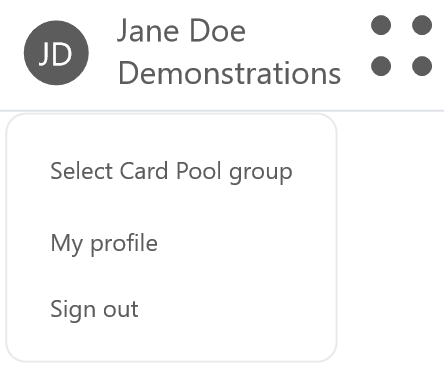
As a Card Issuer Admin user, click the profile icon (the user's initials) in the top right-hand corner of the page, and then click Select Card Pool Group.
You can then select a card issuer, consumer, and Card Pool group from the dropdowns.
You will be shown a read-only view of the Card Pool group that you have selected.